
Make an ordinary street feel extraordinary
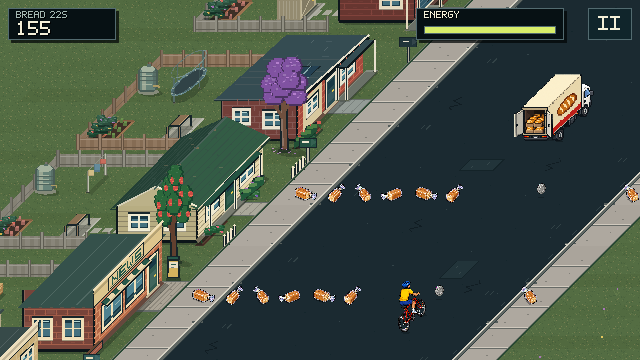
A short in-game demonstration of the Bread Run. The bakery truck turns a familiar suburban detail into a moving route-choice challenge.
View screenshotMagpie Panic turns familiar suburban details into an arcade route. Wheelie bins, garden hoses, front fences, dogs and bread deliveries are not just background decoration. They create different things to notice and different spaces to ride through.
The magpies give the game its identity, but you play as the cyclist. It is an exaggerated pixel-art version of a ride through the neighbourhood, not a cycling simulation or advice for dealing with wildlife in real life.
The angled street view is important to the design. You can move freely across the route rather than switching between fixed lanes, so the gap you choose and the moment you commit both matter.
Survive first. Take a little risk next.
The core actions are deliberately small: steer, duck, hop and manage your energy. Wheelies and ramp tricks add optional risk once those basics feel comfortable. You can ride past a ramp, land without attempting a trick, or release a wheelie early and keep going.
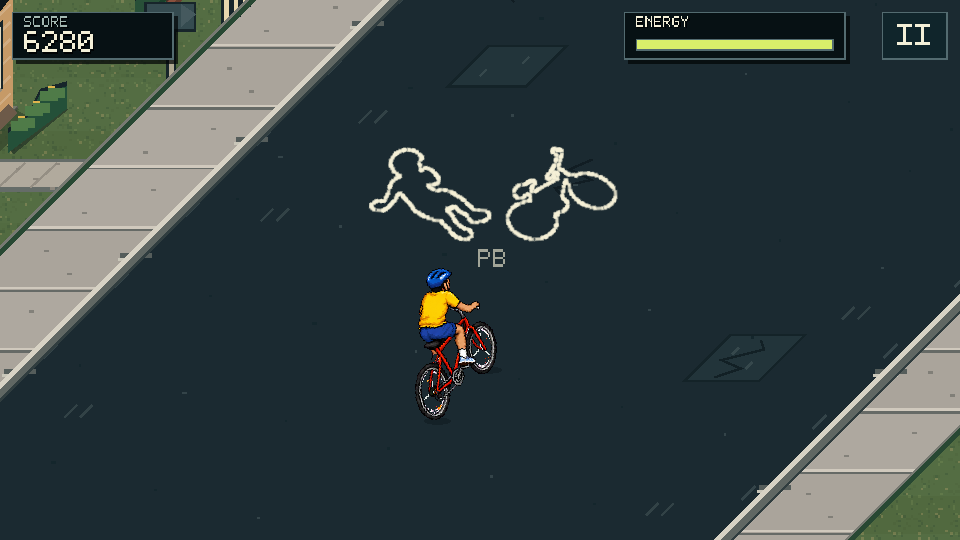
That creates two different ambitions. A cautious ride can chase distance, while a more adventurous one can chase score. Magpie Panic records them separately. The chalk outline on the road is a reminder of the furthest ride, not another object trying to knock you off.
Encounters are meant to change the question you are answering. Bin Day asks you to read a crowded route. A swoop asks for timing. A swarm asks you to stay composed through several attacks. The design goal is variety with readable warnings, not surprise collisions that you had no chance to understand.
A small game, built through iteration
Magpie Panic is built in Godot with a pixel-art presentation and retro-styled audio. The browser game is playable directly on this site, and the Android app is available on Google Play. The iPhone and iPad app is coming soon. Find the mobile apps.
Much of development is about the details that are easy to miss in a still image: where a wheel touches the road, whether a warning is visible beside your thumb, how soon an encounter repeats, and whether a busy section stays smooth.
Player feedback has already shaped the mobile steering and camera, street density, encounter variation and sound cues. The update notes describe published changes and the reasons behind them. An item being worked on is not automatically available in every build.
Automated checks, browser playtests and phone emulation are part of that work. They do not replace feedback from the actual phones and computers people use, particularly for performance and touch comfort.
Your progress stays with you, on this device
The browser game is free to play without an account or payment. Game files load after you choose to play, rather than while you read the website. Use a keyboard on a computer, or turn your phone sideways for touch controls.
Scores, progress and settings are stored locally in your browser. There is no cross-device cloud save, and clearing site data can remove those records. Optional analytics choices are separate from access to the game. The privacy page explains the website and native-app arrangements in more detail.
For the basics, start with How to Play. For the bins, birds and bakery truck waiting further down the road, open the encounters guide.
Talk to Mindset Cyber
For questions, support or feedback about Magpie Panic, email info@mindsetcyber.com.au.
If something looks wrong or a ride runs badly, include your device and browser and explain what happened just before it. The support checklist shows the details that help reproduce a problem without sharing sensitive information.