
· BROWSER GAME 2.14.8
More street awareness on a phone
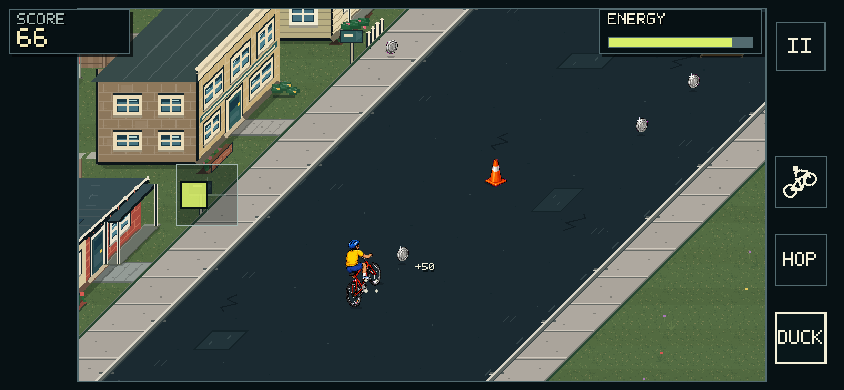
The published 7 October browser layout: floating steering on the left, matching action buttons on the right and both pavements kept in view.
View screenshotThe mobile camera now stays centred on the street instead of following every sideways steering movement. Both pavements remain visible beside the rider, making it easier to read a dog or pedestrian approaching from the edge.
- The steering stick can start anywhere in the safe left half of the game view. Your thumb does not need to find a fixed bottom-corner target.
- Sideways steering is gentler on touch, while pushing up and down still controls pace, braking and wheelie balance.
- Duck, Hop and Wheelie use matching touch-target sizes.
- Directional cues still help with threats beyond the visible diagonal corners. The tiled-ground flicker correction is retained.
Why it changed: a bigger rider is not helpful if the zoom hides an approaching bird or dog. This update balances readability with roadside visibility and keeps the camera steadier as you move.
· BROWSER GAME 2.14.8
Separate space for your thumbs
Mobile controls moved onto side areas around a centred street view. The aim was to keep the steering thumb and action buttons away from the route you are reading. The balance and trick meter moved between those control areas at the bottom.
This release also introduced a gentler joystick response curve. Desktop presentation was left unchanged. The later 7 October camera update builds on this layout, so the current view will not look exactly like an earlier phone screenshot.
What to try: use small steering movements first. If the view feels clipped after rotating your phone, pause and reload in landscape. The mobile help section explains how to leave and reopen the full-window player.
· BROWSER GAME 2.14.8
Clearer feedback, from warning to retry
A game-design pass focused on making the next decision easier to understand without taking the decision away from you.
- Flow scoring and swarm transitions were refined so a change of encounter does not make the scoring rhythm feel disconnected.
- Encounter escalation takes successful riding into account, with clean-pace rewards and more informative ride results.
- Tracked trophies and stunt coaching make it clearer what you are working towards and how an attempt went.
- Input prompts follow the controls in use, and attack symbols provide another way to read incoming swoops.
- Street appearance gained more variation, with reusable scenery work to limit repeated rendering cost.
Why it changed: a fall should leave you with a useful idea for the next ride. Clear warnings and a readable result matter as much as adding another obstacle.
· BROWSER GAME 2.14.8
A busier street with more distinct encounters
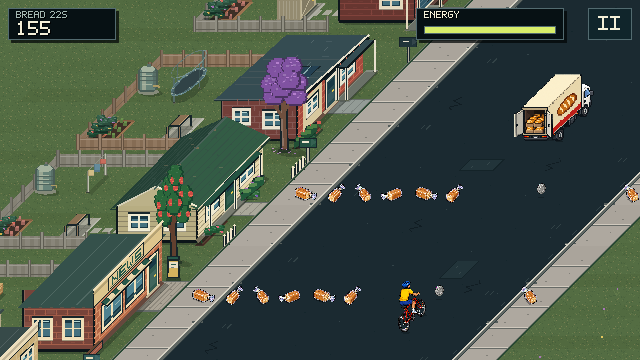
In-game demonstration of Bread Run: a swerving bakery truck drops loaves into the route. The encounter guide shows the other section patterns.
View screenshotSeveral related releases expanded the street and then refined how its events appear. Encounters gained three ride-depth tiers, limits on early exposures and variation in their rhythm. Theme shuffling and recurrence checks reduce immediate repeats and long empty stretches.
- Bread Run: a bakery truck travels ahead of the rider and drops loaves into the route. Later refinements corrected its road perspective and made its wheel rotation easier to see.
- Hose Gauntlet: a distinct navigation pattern helps it feel different from the dense bins of Bin Day.
- Street pedestrians: walking obstacles were added on the pavements. An alternating-leg update followed as part of the same day’s releases.
- Physical sound cues: updated effects accompany hazards, including the dog’s warning bark. These are part of the game’s pixel-era audio treatment.
- Bin Day rendering: drawing work was optimised for denser bin sections, alongside encounter progression changes.
The safety limits for bins, hoses, traffic, swarms and Bread Run remain part of progression. More difficult does not mean every encounter should throw its hardest pattern at a new rider.
The encounters guide explains what to look for and how each section changes your decisions.
How to get an update
Finish your ride, then reload an already-open game tab to load a newly published browser build. A website article or preview does not by itself mean a new game build has been released.
Dates here use the Australian release date. A number of smaller fixes can share the same game version, so include the build identifier too when it is visible and you are reporting a problem.
Browser checks and phone emulation help catch regressions, but they do not cover every real device. If a change improves one layout but creates a problem on yours, send a device-specific report. That feedback is especially useful for touch controls, loading and performance.